← Home Archive Photos About Also on Micro.blog
  • Teaching my thumbs to type

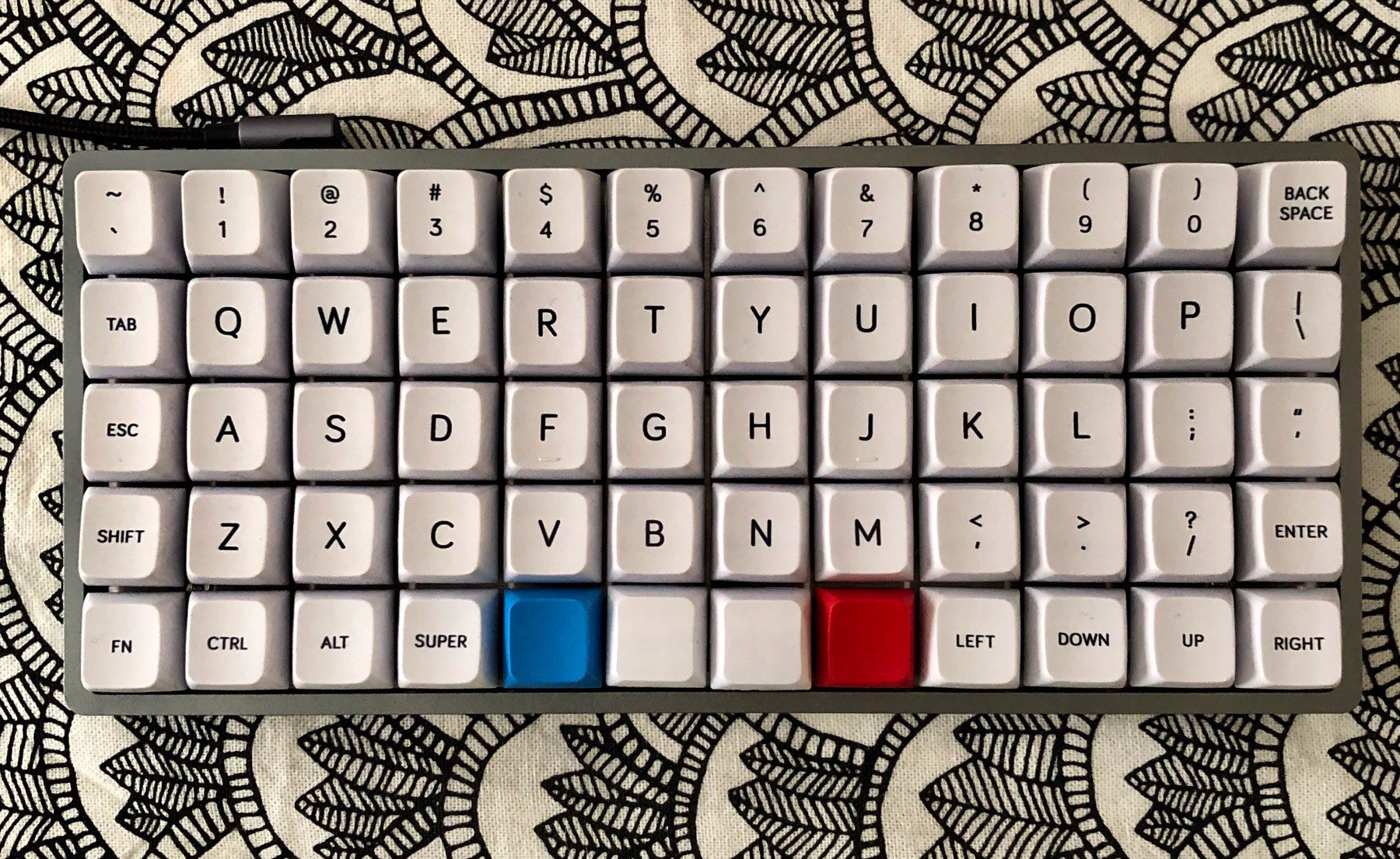
    I’m simultaneously trying to get my fingers used to two keyboards: the Keyboardio Model 01, and the OLKB Preonic.

    There are probably cheaper ways of introducing hordes of errant keypresses into your daily work.

    They’re interesting keyboards. Perhaps the most striking thing they both have in common is how they reduce the space bar to a normal sized key, allowing your thumb access to a lot more keys.

    So, on the current preonic keymap, my thumbs are responsible for the space, delete, enter, shift, command and mode-shift keys. It makes for a compact keyboard, but… it’s probably too much. I thought it’d be a good idea to combine my shift and enter keys, for example (hold down the key and press another key for shift behaviour; just tap the key for enter). I also have that key right beside my space key. Now what happens is that I press enter all the time instead of space. In apps like Slack, where enter starts a new message, that leads to very disjointed and confusing conversations. With your boss. Who might be wondering if you’re drunk.

    However, the neat thing about both keyboards is how you can re-program them to behave almost however you’d like. I think I’m going to break the shift/enter key combo, instead taking a leaf from the default Model 01 layout and combing the enter and space keys instead (tap for space, mode + tap for enter). I’ll post back here after some experience with that.

    Other notes:

    • the ortholinear layout (unlike the staggered keys layout on traditional keyboards) took me no time at all to adjust to. I touch type and don’t even notice the difference.
    • I’ve yet to find a good use for the latching key-switches I added (tap ‘em once to lock them down, tap again to unlock) but I’m still thinking about that
    • typing on heavy clicky mechanical switches (Kailh Box Navy type) is very pleasant but definitely more tiring, and possibly slower too, compared to shallow travel keyboards that bottom out near immediately
    • My keycap set hasn’t enough accent keys, and using words for keys like “alt” means you can’t turn them 180º for easier typing by thumb. It’s the MDA-profile Big Bang 2.0 set - gorgeous otherwise. Despite the mis-sized “8” keycap legend.
    • The current QMK instructions for updating your keyboard layout are right, but not the easiest way to do it - instead, just use the online configuration tool; it’ll compile your firmware for you too!

    → 1:22 PM, Dec 14
  • London in the morning.

    → 10:22 AM, Dec 3
  • My newly built Preonic keyboard from OLKB/Massdrop, with a set of MDA Big Bang 2.0 keycaps on Kailh Box Navy keyswitches, except for a couple of Cherry MX latching keys in the corners (I’ll unpack all that in a bit if you’re not too familiar with custom mechanical keyboards).

    → 2:20 PM, Dec 2
  • Iris Murdoch's The Sea, The Sea: A Review

    I found this book so difficult to read. I literally squirm at the slightest hint of anybody doing something socially embarrassing or something self-interested to the point of harming other people, and this book is FULL of that, full of otherwise excellent people doing appalling things, the narrator more than anyone - but the book is excellent. I recommend it unreservedly. The writing is excellent, both in how it grips you through the most difficult scenes and how it describes the variety of the sea in all weathers, something that resonated as I grew up and live by the coast.

    The 2019 cover

    This must seem so vague so far but I don’t want to spoil anything. It is a very plot-heavy book, though the story is lightly told, entirely from the perspective of the narrator, a retired theatre director in his sixties who is a walking definition of an unreliable narrator. He’s cruel, obtuse and wrong but remains endearing in his own peculiar way.

    It’s a love story too, or a story about a concept of love vs the perception of another couple’s practice of love, and how that can twist your perspective and permit you to think whatever you most need to think…

    It’s so sad in parts, but also so oddly content at the end, post-action, when Murdoch blessedly continues the story so you don’t have to say goodbye to the characters sooner than you’d like.

    It’s a very well-regarded book: it won the Booker in 1978, when it was first published, and has been adapted into radio plays twice by the BBC. The 2019 re-issue comes with an introduction, though it’s one of those introductions far better read after finishing the main book than before. I far prefer the 2019 edition to the 1978 one, which featured a portion of Hokusai’s The Great Wave off Kanagawa. That’s a great piece of art but comes with a lot of associations that don’t quite fit the book (presumably it wasn’t quite as widely known in 1978).

    I might update this when I’ve not had three glasses of wine. But I had to pen it down - please, give The Sea, The Sea a try.

    → 8:29 PM, Nov 10
  • Animating the Pimoroni Keybow keys

    The Pimoroni Keybow is a great little 12-key macro-pad kit. I got mine with Kailh Gold clicky keys too, as I wanted to see what those were like - they’re nice, light to press but with a definite click. They come with a DSA keycap profile too. I’m currently fascinated by keycap profiles and I really want to build a keyboard with high-quality SA keycaps and heavy clicky keys to emulate the look and feel (if not noise!) of the beam-spring behemoths of yore - but that’s a topic for another day.

    Back to the Keybow kit. You can make it without any tools and it gives you a RaspberryPi-powered macropad - a small but fully-fledged computer that you can configure to your heart’s content, if you’re comfortable digging into configuration files and maybe some light programming.

    The Pimoroni Keybow

    Even if you’re not, you can still do some fun things! Each key has an RGB LED under it, and Pimoroni have set it up so that you can animate the LEDs just using an image file in PNG format. Any popular image-editing tool can create these. The image file should be 12 pixels wide, one for each LED, and you can animate it by having additional rows. One row is a single step in the animation (so just have a single row for a static set of lights permanently on).

    It’s not clear from the Keybow’s documentation which column in the image corresponds to which key. It doesn’t match how the keys are numbered in the programming sections. After some experimentation, if you orient the keybow so that the USB cable is coming out of the top, column one of the image is on the bottom left, the bottom right is column four in the image, the top left is column nine, and the top right is column twelve. The two keys in the middle row are columns five and six of the image, and so on.

    With that worked out, I wanted to make a snow animation, matching the orientation of the keys (i.e. with the narrow side facing up). The image file I made is here. It’s not quite as random/unpredictable as I’d like, but a few more animation cycles would help - pull requests welcome :)

    → 7:44 PM, Nov 10
  • For programmers, Vim is the minimal but powerful text editor present on every unix system worth talking about. For designers, Vim is the forename of a renowned designer. If you like either, check out Minimal Vim for a nice exploration of minimalism in font design.

    → 5:41 PM, Nov 5
  • If you’re coming from the javascript/React/Redux web app development world, Henrik Joreteg has a great article on architecting UI state to handle rapid design changes (in part by mandating simplicity). If you’re a ClojureScript developer, Re-frame works like this by default 🎉

    → 2:41 PM, Nov 5
  • Working alone can be very isolating. I’m lucky enough to have access to a desk in an ad agency for when I need to be surrounded by people. At home, I often use The Name of the Rose to generate background noise, for that reclusive 13th-century monk industriousness.

    → 11:33 AM, Nov 4
  • What I love about Halloween isn’t the license to wear a costume and say BOO! to strangers and their children. It’s the extra hour in bed from the Daylight Savings Time changeover. Somehow it syncs well with my sleep pattern so it’s an extra blissful hour asleep. What a gift.

    → 1:11 PM, Oct 27
  • I own more keyboards than shoes 😨

    I’m typing this on a Keychron K1 v3, a tenkeyless (TKL) format keyboard with RGB LED lighting, low profile clicky mechanical switches, macOS keycaps and usable via USB or Bluetooth.

    It was a near-impulse buy and I think it’s so great.

    I think it’s great despite the how the ‘o’ key didn’t work when I first set it up, and how it still likes to ignore those keypresses very occasionally. For a while at first none of my paragraphs had ‘o’s in them, but for this capsule review I’ve only had to insist once twice. And I love having a real escape key again, after trying my best to get used to the virtual one shipped with recent Apple laptops.

    I think it’s great despite the RGB lighting. I don’t need it, but it is kind of fun to play with, and watch shimmer. You can’t create new lighting patterns, or do anything creative beyond picking a pattern and sometimes adjusting the colour. But it’s not too gaudy, definitely nothing like the disco tantrums some gaming keyboards feature.

    I think it’s great despite how it clicks like nothing else. I don’t think it’s distracting for others in an open plan, but it definitely is in a quiet room. That noisy feedback is a huge part of the appeal. Listen to how hard I’m working!

    If you’re tempted, they’re not readily available. I got lucky with my impulse buy. They should eventually become available again at Keychron (this is the third version after all).

    But it should come with a warning label marked “GATEWAY DRUG”. I’m already seriously considering building my own 40% keyboard…

    → 10:53 PM, Oct 25
  • It’s been almost 20 years since I last had a blog. Time to get back into it.

    → 7:19 PM, Oct 25
  • RSS
  • JSON Feed
  • Micro.blog